“I forgot computer password or lost laptop login password without reset disk, is there any way to get into it? This is on a Asus windows 7 laptop.” From Hammer.
Degine :“Lost Windows 7 Dell PC password? I am wonder about how to recover it? “
“I have lost Windows 7 password to Acer computer? What is the best way to access my computer easily without forgotten password?” From Moris.
Bane:“I forgot my HP computer windows 7 administrator login password how to open it?”
“How can I reset my Toshiba computer Windows 7 user password if I couldn't remember the password?” From Jean.
To be honest, it is not difficult to unlock Windows 7 password. If you forgot password on Windows 7, likely you would lock out of Win 7 computer. For most PC user, they have no idea when the computer is still not accessible. Luckily however, I finally get some useful solutions after searching on Internet. Here I would like to share my experience on how to reset computer Windows 7 user or admin password to regain access to PC with all of you.
Indeed, free Windows 7 computer password reset tool can really helpful and it can help you hack into your locked win 7 system. Ophcrack and Offline NT Password Editor are very popular especially for IT expert. However, Ophcrack can only crack a password less than 14 characters, while Offline NT may destroy your win 7 system if you don’t operate it properly. So here I would like to share the best Windows 7 password reset tool - Windows Password Key Enterprise with you. I am sure that you can regain access to your computer in less than 4 minutes no matter how long and complex your password is. Moreover, it is easy to use for computer newbie.
Step 1: Download Windows Password Key from http://t.co/x8otIyR14H.
Then install and launch it on another available PC. Inset a USB flash drive into it. Click "Burn" to burn a recovery disk for Windows 7.
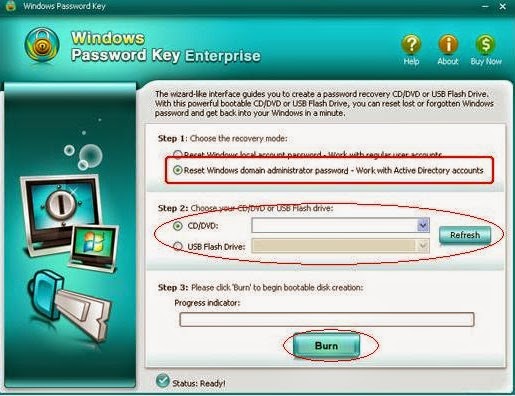
Step 2: Insert the newly created USB drive to the locked Windows 7 computer. Set USB drive as the first boot device in BIOS setup. This computer will reboot.
Step 3: After Windows Password Key loads, follow the interface to unlock computer Windows 7 login password and login in without password.
After reading this post, you should have learned how to reset Windows 7 password with Windows Password Key when you forgot or lost the password. If not, read it again. By the way, you can also reset computer Windows 8.1/8/Vista/XP password as this method.
